
A still of a woman under a clear umbrella becomes a slow walk toward the camera, with rain and traffic sound.
Image to video AI with native sound
Upload a photo, describe the motion, and get back a moving clip with sound.
Animate a photo
Upload a portrait, a pet shot, a landscape or a painting and describe what should move. The photo becomes the first frame, so the clip opens on your picture and the motion grows from there.
Product and ad clips from a still
Approved product shots and campaign stills become motion without a reshoot. Kling 4.0 builds a new scene from up to 10 stills, and Seedance 2.5 turns one reference photo into a scripted spot with spoken lines.
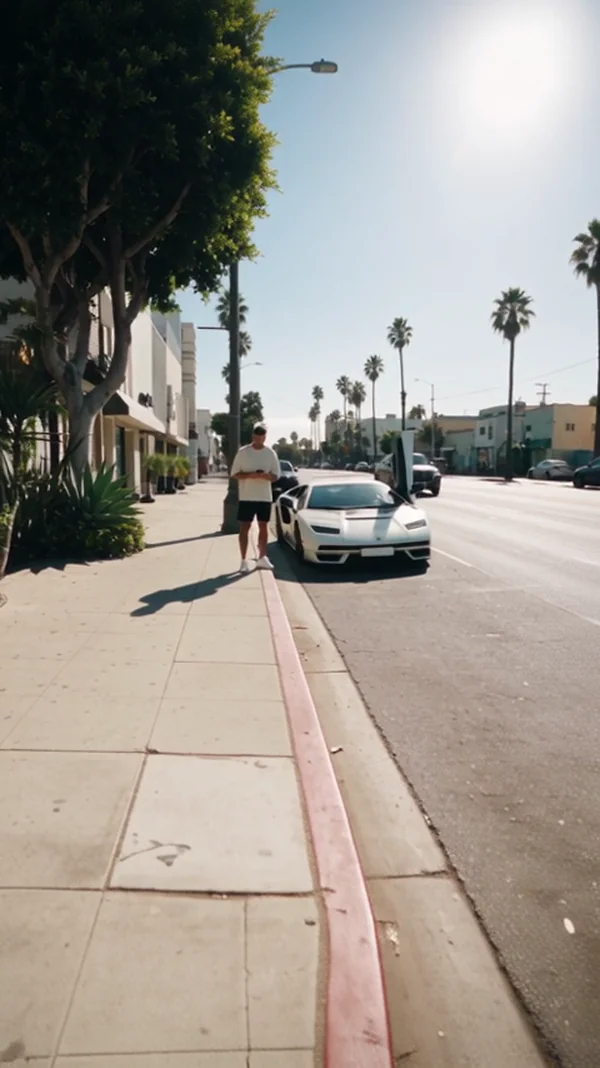
One still of a man and a white supercar becomes a 20 second street interview with spoken dialogue.
A courier still and a bicycle still become one 8 second street shot, with a bell ring and tire sound.
A neon koi illustration swims through the air for 10 seconds, a moving hero for a banner or landing page.
Start and end frames, talking photos
Pin both ends of the shot, or give a portrait a voice. Kling 3.0 Omni animates between a first and a last frame, OmniHuman 2.0 lip syncs a portrait to your audio, and Kling Motion Control copies moves from a clip.
Two stills, a first and a last frame. The model animates the change between them, with sound.
A portrait plus a voice recording becomes a lip synced clip as long as the audio.
One still of a kitten picks up the moves of a reference dance clip on a night street.
Why turn images into video on Kubeez
Your photo is the first frame
Seedance 2.5 and Kling 3.0 take a start frame with an optional end frame. Veo 3.1 takes one start image, and Grok Imagine Video 1.5 always starts from one image, for any length from 2 to 15 seconds.
Pin the last frame too
Kling 3.0 Omni Frames animates between exactly two stills, first then last, at 720p, 1080p or 4K. Veo 3.1 also takes two frames, and Seedance 2 needs both a first and a last frame.
Sound comes with the clip
Veo 3.1 always generates audio, Kling 3.0 Turbo has sound always on, and Seedance 2.5 speaks 11 officially supported languages. Seedance 1.0 is the silent option for a JPEG, PNG or WebP up to 10 MB.
Make a portrait talk or dance
OmniHuman 2.0 lip syncs one portrait to an MP3 or WAV of 4 seconds to 5 minutes, at 720p. Kling Motion Control takes one still and one clip, and the video runs as long as the clip.
How it works
- 1

Add a photo
Optional. Upload a picture to animate, edit or use as a reference.
- 2
Write the prompt
Describe what you want to see, or open an example on this page and change it.
- 3

Generate and download
Pick the model, generate, and download the file to post or use anywhere.
Pick a plan
One credit balance covers images, video and audio. Pick the size that fits how much you make.
Most popular
Studio Pro
Studio value with extra headroom.
49 EURmonth
6,400credits / month
Team seats

2 seats included
What you'll generate
- Images~1,600
- Songs~457
- Videos~640
- Separations~1,066
- Caption Minutes~213
- All modelsIncluded
Starter
Low tier generations for regular use.
10 EURmonth
1,100credits / month
What you'll generate
- Images~275
- Songs~78
- Videos~110
- Separations~183
- Caption Minutes~36
- All modelsIncluded
Pro
Access full experience.
20 EURmonth
2,600credits / month
What you'll generate
- Images~650
- Songs~185
- Videos~260
- Separations~433
- Caption Minutes~86
- All modelsIncluded
Powerhouse
Most cost efficient.
99 EURmonth
13,000credits / month
13,000 credits/mo
Team seats
3 seats
Extra seats €19/seat/mo
What you'll generate
- Images~3,250
- Songs~928
- Videos~1,300
- Separations~2,166
- Caption Minutes~433
- All modelsIncluded
Enterprise
For teams that outgrow standard plans.
Custom
Pricing tailored to your team
What's included
- Custom number of seats
- Custom credit volume
- Invoice billing
- Priority support
Starter
Low tier generations for regular use.
10 EURmonth
1,100credits / month
What you'll generate
- Images~275
- Songs~78
- Videos~110
- Separations~183
- Caption Minutes~36
- All modelsIncluded
Pro
Access full experience.
20 EURmonth
2,600credits / month
What you'll generate
- Images~650
- Songs~185
- Videos~260
- Separations~433
- Caption Minutes~86
- All modelsIncluded
Most popular
Studio Pro
Studio value with extra headroom.
49 EURmonth
6,400credits / month
Team seats
2 seats included
What you'll generate
- Images~1,600
- Songs~457
- Videos~640
- Separations~1,066
- Caption Minutes~213
- All modelsIncluded
Powerhouse
Most cost efficient.
99 EURmonth
13,000credits / month
13,000 credits/mo
Team seats
3 seats
Extra seats €19/seat/mo
What you'll generate
- Images~3,250
- Songs~928
- Videos~1,300
- Separations~2,166
- Caption Minutes~433
- All modelsIncluded
Enterprise
For teams that outgrow standard plans.
Custom
Pricing tailored to your team
What's included
- Custom number of seats
- Custom credit volume
- Invoice billing
- Priority support
Or pay-as-you-go
Test any model with one-time credit packs
Credits never expire and don't require a subscription — buy a pack, generate, see if Kubeez fits.
Quick refill
Quick refill for short bursts of generation.
Credits
500
You pay
€6
Standard pack
Mid-size pack at the standard per-credit rate.
Credits
1,500
You pay
€18
−5%
Volume pack
Larger pack with a volume discount built in.
Credits
5,000
You pay
€60€57
−10%
Production pack
Best per-credit price for sustained production.
Credits
15,000
You pay
€180€162
Questions
Yes. Upload the photo, describe the motion and pick a model. The photo becomes the first frame, and Seedance, Veo, Kling and Grok animate it, most of them with sound.
On most models, yes. Veo 3.1 always generates audio, Seedance 2.5 has it on by default, and Grok returns video with audio. Seedance 1.0 is always silent.
Seedance 2.5 holds one take for up to 30 seconds. Kling 3.0 runs 3 to 15 seconds, Grok Imagine Video 1.5 runs 2 to 15, and Veo 3.1 clips are 8 seconds.
Seedance 2.5 for long takes and dialogue, Veo 3.1 for 8 second shots up to 4K, Kling 3.0 Omni to bridge a first and last frame, and OmniHuman 2.0 for a talking portrait.
Signing up is free and new accounts get starter credits to try it. After that you buy credits or pick a plan. There is no permanent free tier.
Make your first one now
Sign up, open the dashboard and start from a prompt or a photo.